所有排列

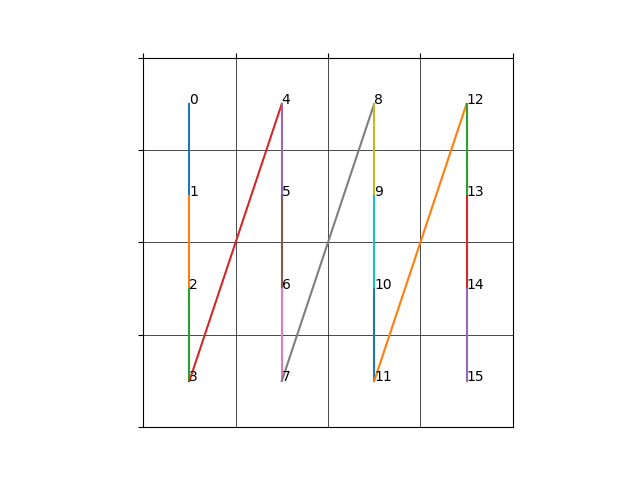
由于排列本身的递归形式,可以通过回溯不断生成所有的排列。例如序列为 [1,2,3,4],当我们确定第一个位置为 1 后,剩下三个位置,此时有效的排列就变成了 剩下三个数 [2,3,4] 在剩下三个位置上的全排列了,这样我们就从求 [1,2,3,4] 的全排列变成了求 [2,3,4] 全排列,当序列长度为 1 时其排列就为其本身,递归终止。

根据这个思路我们就可以写出所有的全排列了

1
2
3
4
5
6
7
8
9
10
11
12
13
14
15
16
17
18
19
void permutations(const std::vector<int>& numbers,
std::vector<int>& curr,
std::vector<int>& visited,
std::vector<std::vector<int>>& output) {
if(curr.size() == numbers.size()) {
output.emplace_back(curr);
return;
}
for(int i=0;i<numbers.size();i++) {
if(visited[i]) {
continue;
}
visited[i] = true;
curr.emplace_back(numbers[i]);
permutations(numbers,curr,visited,output);
curr.pop_back();
visited[i] = false;
}
}
阅读全文 »

二叉树实现

不同语言实现起来都差不多,给出 C++ 版本的模版实现

1
2
3
4
5
6
7
8
9
10
11
12
13
template <typename T> struct TreeNode {
using value_type = T;
using ptr_type = TreeNode<T> *;

value_type val{};
ptr_type left{nullptr};
ptr_type right{nullptr};
};

template <typename T>
std::ostream &operator<<(std::ostream &os, const TreeNode<T> &node) {
return os << node.val;
}

递归遍历

由于二叉树本身的递归特性,通过递归函数可以很简单的遍历二叉树,根据访问根节点顺序不同可以分为前序、中序和后序,对应代码如下

首先定义访问函数以及递归遍历函数

1
2
3
4
template <typename T> void visit(TreeNode<T> *node) {
std::cout << "visit: " << *node << std::endl;
}
std::function<void(node_ptr)> recursive;
阅读全文 »

整体结构

1
2
3
4
5
6
7
8
9
10
11
12
13
14
15
16
17
18
19
20
21
22
23
24
25
26
27
28
29
.
├── .gitignore
├── .gitmodules
├── CMakeLists.txt
├── LICENSE
├── README.md
├── build
├── cmake
│ ├── CMakeLists.txt
│ └── ...
├── data
│ ├── .gitkeep
│ └── ...
├── extern
│ ├── CMakeLists.txt
│ └── ...
├── src
│ ├── CMakeLists.txt
│ ├── glad
│ ├── lumos
│ └── stb
└── test
├── CMakeLists.txt
├── test_gl.cpp
├── test_imageio.cpp
├── test_imgui.cpp
├── test_pcg.cpp
├── test_random_permutation.cpp
└── test_viewer.cpp
阅读全文 »

ubuntu(国内镜像)

由于网内网络环境的问题,ubuntu不换源的话基本没法用,我们首先参考普通 ubuntu 系统如何换源,然后将其转换成命令形式,便于应用于 Dockerfile 中。

随便在网上搜 "ubuntu换源",可以搜出一大堆教程,这里我们直接参考阿里云开源镜像站的官方教程,官方教程中给出了操作办法,就是手动将所有的源地址替换为阿里云的镜像地址:

首先我们使用 docker 跑一个 ubuntu 的镜像看下基本情况:

1
docker run -it --rm ubuntu:20.04 /bin/bash

注:后面也会写一个笔记记录常用的 docker 命令。

在 ubuntu 下使用 sudo apt-get install xxx 安装软件,所有 apt 相关的配置项存储在 /etc/apt 文件夹下,其内容如下

阅读全文 »

最近需要在服务器上跑模型,需要长时间运行,但是服务器是通过 ssh 连接的,如果我们中途断开连接,正在跑的代码也会自动关闭。实在是有点整蛊,要想 ssh 断开连接后代码还可以继续执行,需要使用 nohup 命令。

使用 nohup --help,我们可以得到帮助信息

1
2
3
4
5
6
7
8
9
10
11
12
13
14
15
16
17
18
19
20
21
22
(base) ➜  ~ nohup --help
Usage: nohup COMMAND [ARG]...
or: nohup OPTION
Run COMMAND, ignoring hangup signals.

--help display this help and exit
--version output version information and exit

If standard input is a terminal, redirect it from an unreadable file.
If standard output is a terminal, append output to 'nohup.out' if possible,
'$HOME/nohup.out' otherwise.
If standard error is a terminal, redirect it to standard output.
To save output to FILE, use 'nohup COMMAND > FILE'.

NOTE: your shell may have its own version of nohup, which usually supersedes
the version described here. Please refer to your shell's documentation
for details about the options it supports.

GNU coreutils online help: <https://www.gnu.org/software/coreutils/>
Report nohup translation bugs to <https://translationproject.org/team/>
Full documentation at: <https://www.gnu.org/software/coreutils/nohup>
or available locally via: info '(coreutils) nohup invocation'

其中第三行解释了 nohup 命令的作用

Run COMMAND, ignoring hangup signals.

从描述中我们可以看到,其作用其实很简单,就是忽略 hup 信号。那么现在问题来了,hup 信号是什么?有什么作用?

阅读全文 »

zerotier 可以将不同局域网下的主机连接到同一个虚拟局域网内(即内网穿透),使用之前需要注册一个 zerotier账号,所有对虚拟网络的操作(设备管理、ip设置等)都需要在 web 端进行。官方网址:https://www.zerotier.com/

注册 Zerotier 账号

注:zerotier 服务器在国外,访问的时候可能需要挂梯子。

进入官网

点击右上角的 Sign Up 按钮就可以进入注册页面

阅读全文 »

在 Windows 下跑 Python 深度学习代码时,需要编译 C++ 库(点名 Pytorch3d),但是使用最新版本的 MSVC 进行编译的时候会报错,去 Github 看 Issue 时有提到降级可能有效,我们可以通过添加组件的方式直接下载指定版本的 MSVC 编译器。然后手动修改进行切换。为了怕后面遇到类似问题时忘记怎么搞,还是简单记录一下吧,具体操作如下:

  1. 首先打开 Visual Studio Installer,点击 修改 按钮

    阅读全文 »

刷牛客时经常能刷到面向对象相关的题目,多态作为面向对象中的一个重要特性(封装,继承和多态),在八股中经常考察其实现原理。为了方便理解,我们给出一个简单的多态样例

1
2
3
4
5
6
7
8
9
10
11
12
13
14
15
16
17
18
19
class A {
public:
virtual int func1(int v) { return value + v; }
virtual int func2(int v) { return value - v; }
int func3(int v) { return value * v; }
static int func4(int v) { return v * 2; }

public:
int value{0xfeff};
};

class B : public A {
public:
int func1(int v) override { return value + 2 * v; }
int func3(int v) { return value * 2 * v; }

public:
int value{0xfffd};
};

接下来就是经典调用函数写输出

1
2
3
4
5
6
7
8
9
10
11
12
13
int main(int argc, char **argv) {
B b;
b.value = 2;
A *a = &b;
a->value = 4;
int v = 20;
fmt::print("b.A::value={}\nb.B::value={}\n", b.A::value, b.B::value);
fmt::print("a->func1({}) = {}\n", v, a->func1(v));
fmt::print("a->func2({}) = {}\n", v, a->func2(v));
fmt::print("a->func3({}) = {}\n", v, a->func3(v));
fmt::print("a->func4({}) = {}\n", v, a->func4(v));
return 0;
}
阅读全文 »

Encodings should be known, not divined.

问题描述

在前一篇我们使用 pandoc 的 lua filter 解决了 markdown 转 html 中链接问题,但是在调试代码的过程中发现了一个问题,在不同的 shell 中执行 lua 脚本时,输出中文有时会乱码,有时又不会乱码,搞得有点烦,本篇就针对字符串问题做一个探究,搞清楚乱码的源头以及解决方案。

首先看一个简单的示例,下面是一段简单的 C 语言 hello world

1
2
3
4
5
6
#include <stdio.h>

int main(int argc,char** argv) {
printf("你好,世界!😉");
return 0;
}

文件保存格式为:UTF-8(注意看 vscode 的右下角,写着 UTF-8)

阅读全文 »

Hexo Plugin

参考官方文档,我们有两种创建插件方式

  1. 以脚本(Scripts)形式(单个文件)
  2. 以 npm package 形式创建(支持多文件)

对于一般的插件而言,如果代码并不复杂且依赖较少,可以直接写成脚本形式,放在 hexo 根目录下的 scripts 文件夹即可(不存在直接创建一个即可),在介绍插件具体写法之前,先看一个简单的例子:

文件:scripts/test.js

1
2
3
4
5
hexo.extend.filter.register('before_post_render', (data) => {
const {log} = hexo;
log.debug("hello from test.js!!!");
return data;
});

然后执行下列命令查看效果

1
hexo clean && hexo generate --debug

这一条命令包含两个子命令,hexo clean 清除之前的生成文件,之后的 hexo generate 用来生成静态页面文件。

--debug 标志会使 hexo 在终端显示调试信息,在所有的 hexo-cli 命令中都可以使用)

阅读全文 »
0%